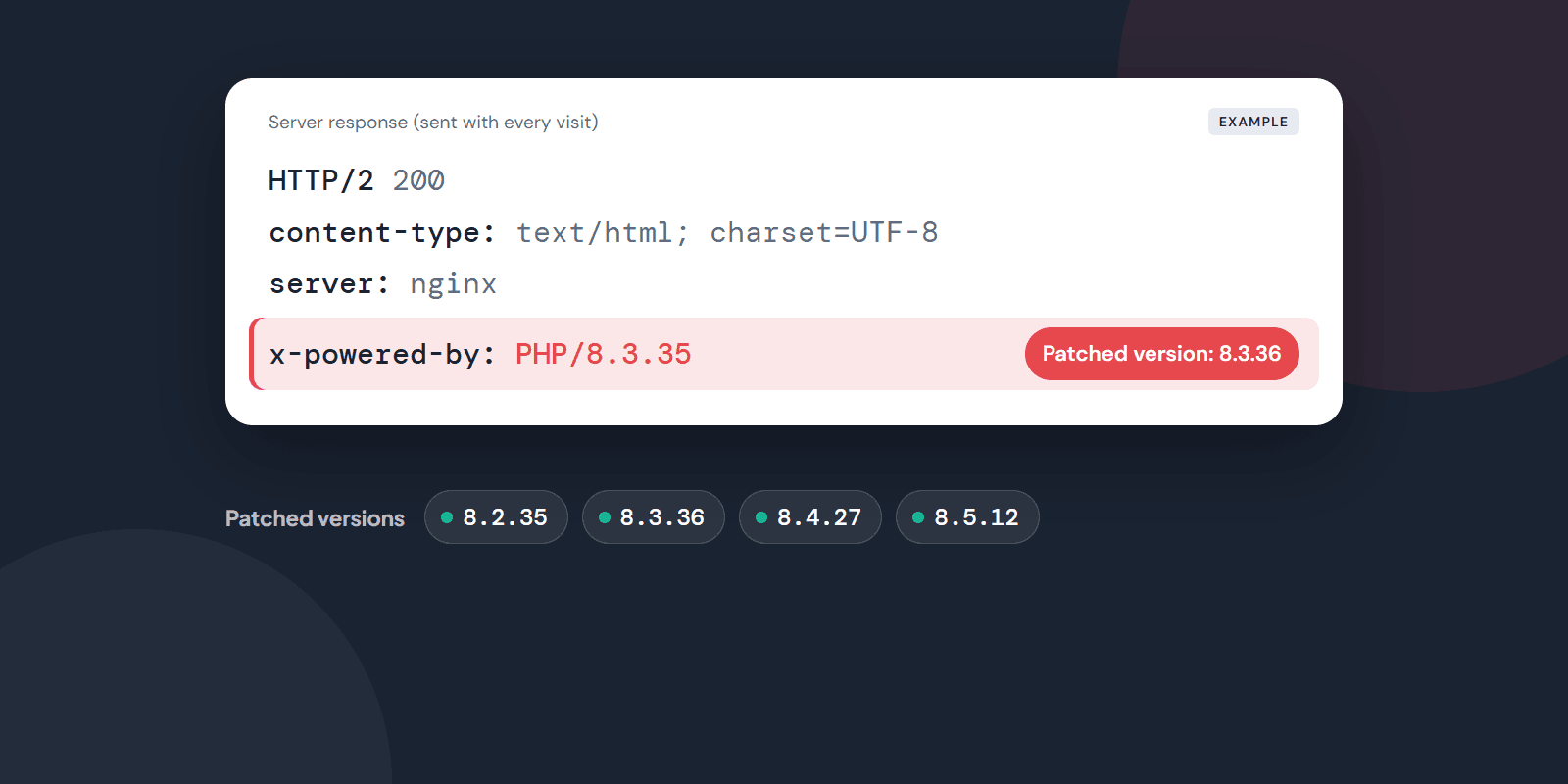
Short answer: If your website runs on PHP (every WordPress site does) and the PHP version on your server is older than the releases of 21 October 2026, you may be at risk. The fix is simple: confirm with your hosting provider today that PHP has been updated to a patched version. You can also run a first check yourself by entering your website address in the box below.
What is PHP2Shell?
PHP is the programming language behind a large share of the websites on the internet. WordPress, many e-commerce platforms and most company websites run on PHP.
On 21 October 2026, the PHP team released new versions that fix two critical security vulnerabilities. Their official identifiers are CVE-2026-109618 and CVE-2026-109619. They are widely known as "PHP2Shell".
Both vulnerabilities can lead to the same result: an attacker can run their own commands on the server without logging in to any account on the site. That can mean a defaced website, stolen data, or a server used to attack others.
After the news broke, several organisations around the world took their websites offline for a while as a precaution. Official advisory: php.net security announcement.
Which versions are safe?
These versions fix the vulnerabilities:
| PHP branch | Patched version (this or later) |
|---|---|
| 8.2 | 8.2.35 |
| 8.3 | 8.3.36 |
| 8.4 | 8.4.27 |
| 8.5 | 8.5.12 |
There is no official fix for PHP 8.1 or older. These versions no longer receive security updates from the PHP team. If your site runs on one of them, you need to move to a supported version.
My version number looks old. Am I definitely affected?
No, not definitely. Hostinger and some other hosting providers may have applied the fix automatically without changing the version number. But it is worth making sure. Hostinger announced patched builds for every version from 5.2 to 8.5. Operating systems such as Ubuntu, Debian and AlmaLinux also ship the fix in their own packages. In these cases the version number looks old, but the fix may be installed.
The way to verify is the Build Date on the PHP info page. If it is 21 October 2026 or later, the fix is most likely installed. Your hosting provider has the definite answer.
We ran into this ourselves. The first version of our Digital Readiness Score tool showed a red alert for every site with an old-looking version number. Someone we know pointed out that Hostinger had already installed the fix. We corrected the tool the same day. It no longer says "there is a problem" in this case. It says "please check".
Is my website affected?
There are a few ways to find out which PHP version your site runs on.
Hosting control panel: Panels such as cPanel, Plesk or Hostinger have a "PHP version" or "PHP configuration" section. The version is shown there.
If you use WordPress: In the admin dashboard, go to Tools → Site Health → Info → Server. The PHP version is listed there.
From the outside: Many servers openly report their PHP version with every response. Our Digital Readiness Score tool reads this and compares it with the patched versions. All you need is your website address.
Check your website now
Enter your address and see your PHP version and the overall state of your site in 30 seconds. Leave your email address and the full report is sent to you.
Protocol is optional — https:// is added automatically.
It is also fair to say what the tool cannot see. If your server hides its PHP version, the tool makes no judgement. If the version number looks old, it says "please check" and gives no final verdict, because whether the fix is installed cannot be seen from the outside. If the site is on Hostinger, it also shows Hostinger's announcement. Your hosting provider has the definite answer.
What should I do?
Most company websites run on shared hosting. In that case the hosting provider updates PHP. Your job is to get confirmation from them.
You can send their support team this question:
"Which PHP version does our website run on? Is the patched version for the PHP2Shell vulnerabilities announced on 21 October 2026 (CVE-2026-109618, CVE-2026-109619) installed?"
If you can choose the PHP version yourself in the panel, move to the newest version in the same branch. For example, if you are on 8.3.35, move to 8.3.36. Changing the main version (for example from 8.1 to 8.3) can affect plugins. Take a backup of the site before you do that.
If you manage the server yourself, install the operating system's security updates now and restart the PHP service.
Do WordPress automatic updates fix this?
No. WordPress automatic updates update WordPress itself, its plugins and themes. PHP is separate software running on the server. Your hosting provider or server administrator updates it.
Keeping WordPress and its plugins up to date still matters on its own. The Digital Readiness Score tool checks your WordPress version too.
Is showing the version number a problem?
A server that publicly reports its PHP version is not a vulnerability by itself. But it makes an attacker's job easier. Unpatched servers can be found in bulk by looking at this information.
You can ask your hosting provider or server administrator to hide it. The technical name is the expose_php = Off setting. This setting does not replace the update. It only makes your site less visible in mass scans.
Sources
🗓️Let's map your personalised roadmap in a free 30-minute strategy call.
Book a Free Call🛡️Is your organisation NIS2-ready? Discover your cyber security maturity level in 60 seconds.
Start the NIS2 Maturity TestFound this useful? Share it with your team.